The Bookings Report creates a summary report of booking activity and room revenue generated on a specific date or date range by Agent, Company, Guest Type, Rate Plan, Room Type, Source and User.
This report is primarily used to analyze the volume of booking activity and the room revenue generated by source, room type, etc. This includes the # of bookings, room nights, ADR, total revenue, % of revenue.
It is useful for tracking the booking activity and productivity for specific channels or agents and can be used to see which room types are getting the most bookings, have the highest ADR and generating the most revenue, etc.
Because there is a secondary 'sort' or 'groupings' function for running this report, the report can be 'grouped' for a secondary option, if desired, though not required. 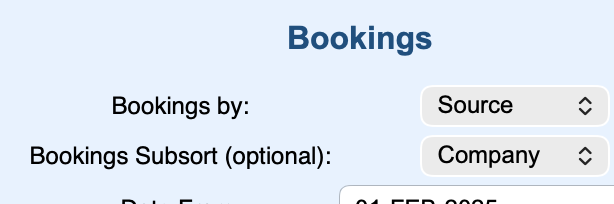 . In this example, the primary analysis is a search for bookings organized by Source, and then it will 'group' the results by Company under that result. Handy for quick analysis.
Things to know about the Bookings Report
- The revenue totals generated in a Bookings Report are for Room Rent only. To see total Revenue (including non-room revenue) by source or for a specific time period, use the Revenue Report. The room rent revenue on the Bookings Report will match the total room rent revenue in the Revenue Report if sorting by the same term, ONLY if RENT was posted each date. If any date had a missing ROOM RENT posting or more than 1, than these 2 reports can vary. See Revenue Report
- To compare productivity to previous periods, run the same report for different date ranges. You can save the reports to Excel or .csv to merge the data and graph the comparisons. See Saving Reports to Excel
- This report is intended to be a calculation for bookings staying during a time period. As such, it is based on an Occupied Date and is not using the concept of a ROOM RENT folio posting to validate what was a actually charged on the date; rather what Rate was saved with the bookings during the period queried. Thus it might not match identically with the Revenue Report. See Revenue Report
- If you are trying to find out how many booking were made during a time period, run the Booking Production Report. See Bookings Production Report
- You can also use Search Bookings to create detailed list of bookings filtered by search criteria such as, room type, rates, etc. This can be helpful in trying to locate any discrepancies.
Tip
Use Search Bookings to create detailed list of bookings sorted by user and "created on" dates.
"Booking by" sort terms:
Keep in mind that since some of the sort options in this report are generated from data you enter like Source and Guest Type so entering relevant terms to your business can help with planning and marketing.
The following sort terms can be entered and customized in setup.
- Guest Type - We provide default Guest Type terms like 'Return" and "Phone". These can be edited and you can add more Guest Types in the Setup Area. We encourage you to setup Guest Types that are relevant to you like Return, First Time Guest, Referral, etc. Guest Types are entered in the Booking Data of each booking.
- Sources - We provide default Source terms like 'Unknown" and "website". These can be edited and you can add more sources in the Setup Area. We encourage you to setup Sources that are relevant to sources you are using like Groupon, Travel Agent, Front Desk, Etc. Sources are entered in the Booking Data of each booking.
- Agent - Name of Travel Agent entered in booking. This will say "None" if not entered in booking data .
- Company - Company name in booking data if entered. This will be blank if not entered .
To create a Bookings Report:
- Go to REPORTS | MANAGERS REPORTS
- Click on Bookings Report
- Choose Date: Choose a single date or date range. I.e. for a single date choose Dec. 1, 2015 and Dec. 1, 2015 in both the start and end dates.
- Bookings By: Sorts revenue by chosen term in drop down list: Agent, Company, Guest Type, Rate Plan, Room Type, Source and User. You must choose a sort term. Note: All reports will result in the same revenue amount, but will say "none" for Agent and "unassigned" for Company if none is chosen in the Booking data.
- Choose the report format: HTML, Excel or Text.
- Click Generate Report
Bookings Report displays the following information:
- First column: This column is titled with the sort term you chose. I.e. if you choose Source, the first column will be title Source. If you choose Room Type, the first column will be titled Room Type.
- Room Nights: Total number of nights in all bookings.by the sort term chosen.
- Bookings: Total Bookings made by sort term: CONFIRMED, UNCONFIRMED, CANCELLED, COMPLETE
- Avg Nights: The average nights of the total bookings made.
- ADR: Average daily rate of the total bookings made by the sort term. % of Rate Revenue from the rates saved with the bookings - NOT the actual RENT posted to the folios.
- Room Revenue: Total Room Revenue from booking NOT including taxes. This displays totals from the rates originally saved with the bookings - not any charges (such as RENT) posted to the folio(s)
- % Room Revenue: % of total room revenue by the sort term chosen. Total Room Revenue from bookings NOT including taxes. This displays totals from the rates originally saved with the bookings - not any charges (such as RENT) posted to the folio(s)..
See report examples: Bookings Report Source and Bookings Report Room Type
Overview
Content Tools