The Booking Engine Templates can be customized depending which Booking Engine Template you choose, There are also several features that can be optionally enabled. To see a detailed description of the Booking Engine Templates and how to view and use them see Booking Engine | Website Code.
See detailed instructions on how to customize each of these website templates below:
| Booking Engine Template - Hotel Description | Booking Engine Template - Calendar |
|---|---|
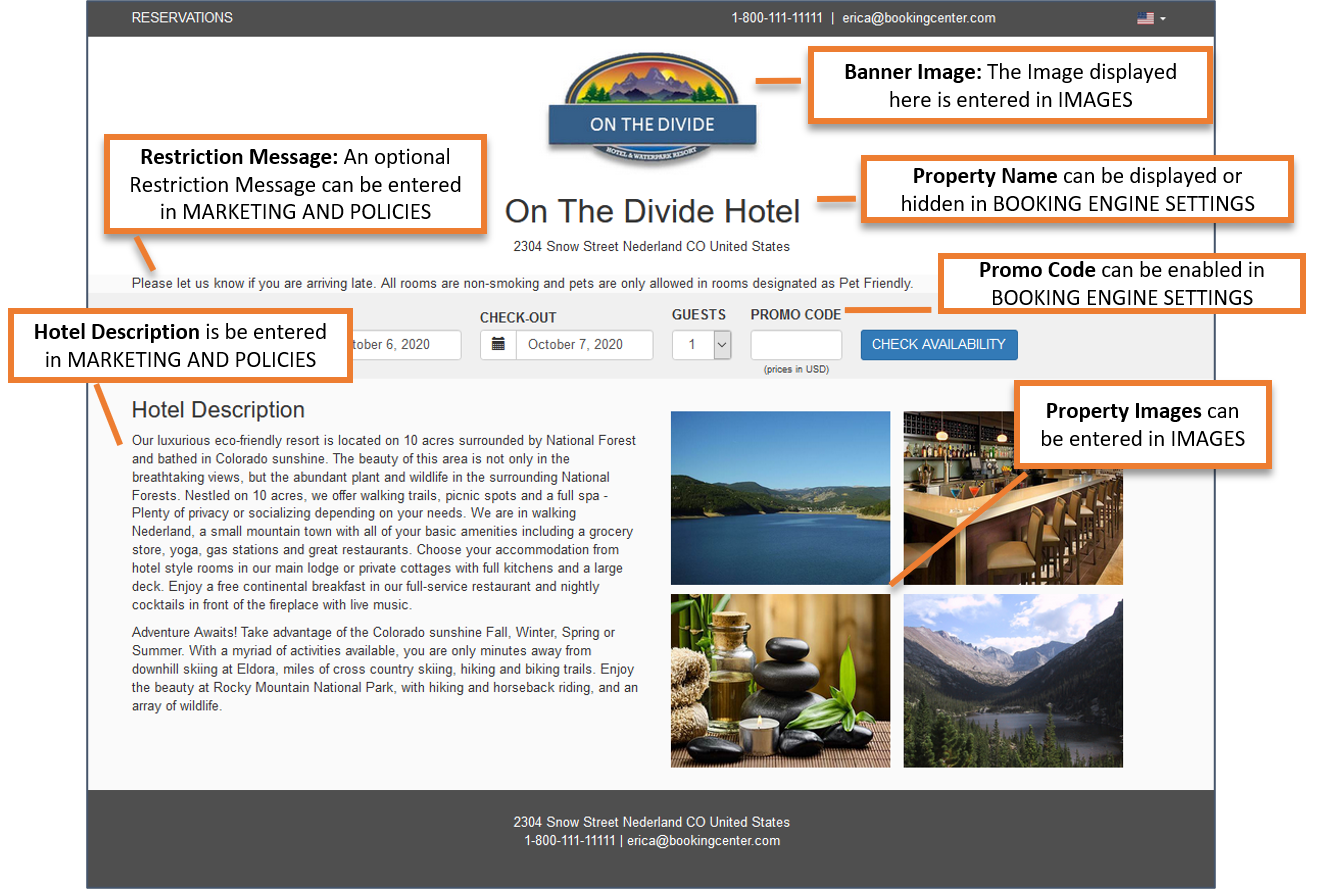
Click image to enlarge This landing page can be customized with a Hotel Description and Images. |
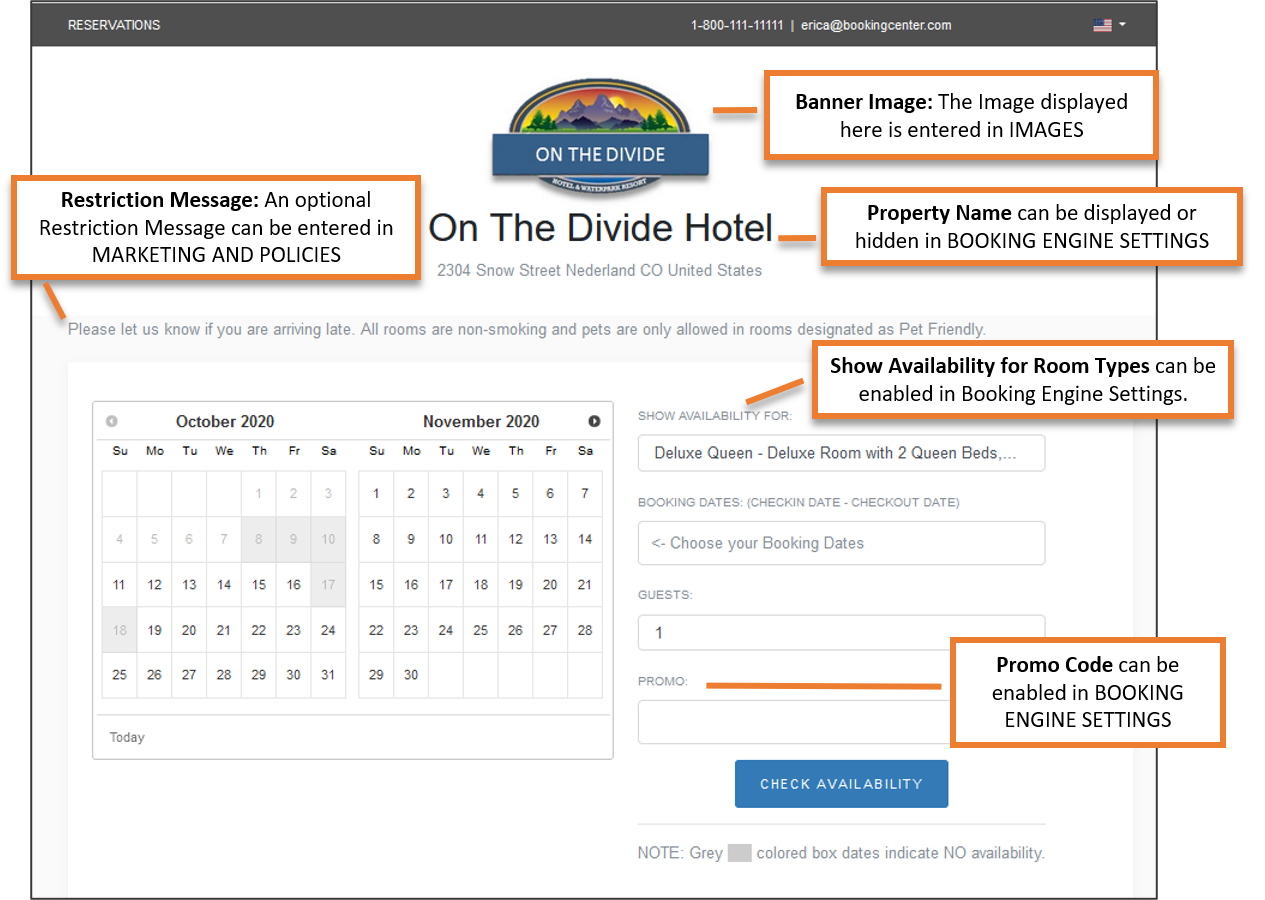
Using an 'Calendar of Availability' as the default 'introductory' page, this Booking Engine template offers a visual calendar option of property availability (ie, showing which dates have rooms and which do not) and enables Guests to choose arrival and departure dates. |
| Booking Engine Template - Lowest Rate Calendar | Booking Engine Template - Calendar by Room Types |
|---|---|
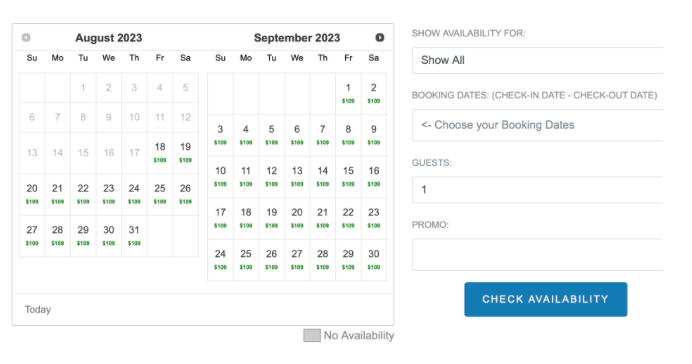
Click image to enlarge This template shows the lowest rates offered on a given for guests shopping by rates. |
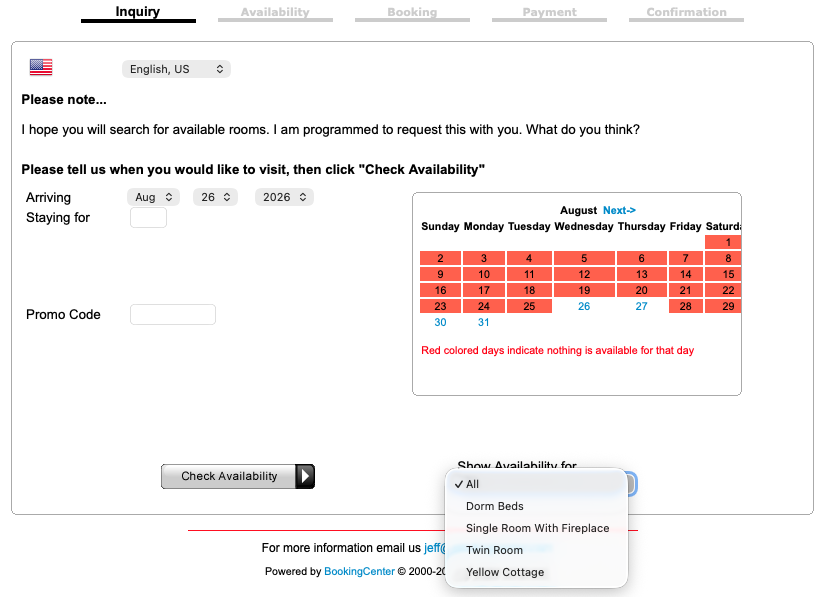
Click image to enlarge This template allows guests to see a calendar of availability via the different Room Types offered. |
NOTE: Some customers to choose to avoid this 'Front Page' entirely, and use the Quick Reservation Feature on their website to present a clear 'call to action' accepting 'Arrival Date" and 'Departure Date' so that, when submitted, the user gets availability results from the Booking Engine for those dates. This approach has been shown to generate more bookings - look at major hotel websites and this is how they implement the Booking Engine. We describe how you can do this in this Knowledge Base Article.
Booking Engine
- Booking Engine | Website Code
- Booking Engine | Customize Front Page
- Booking Engine | Room Description
- Booking Engine | View Details
- Booking Engine | Image Slideshow
- Booking Engine | Rate Plans
- Booking Engine | Policies
- Booking Engine | Confirmation Letter
- Booking Engine | Custom URL Links
- Booking Engine | Custom HTML
- Booking Engine | ADA Compliance
- Booking Engine | Sojern and DerbySoft
- Booking Engine | Inventory Items and Packages
- Booking Engine | Select Rooms and Rates
- Booking Engine | Content Security Policy (CSP)
- Payment Technologies Offered for Online Bookings
- Lowest Rate on Calendar
Customization - All Templates
- Banner Image: To change your Banner image in MyPMS, go to SETUP | FEATURES AND IMAGES | IMAGES. The first image in the list For step-by-step instructions on how to edit this information, see Images. Insert any image you choose as the Banner image. This can be a logo, graphic, image, etc.
- Property Name: You can choose whether or not to display or hide your Hotel Name on the Booking Engine. Go to Booking Engine Settings
- Contact Details:The address, phone number and email address displayed are entered in SETUP | PMS | SITE DETAILS. For step-by-step instructions on how to edit this information, see Site Details
Restriction Message: An optional Restriction Message can be entered in Marketing And Policies
Promo Code can be enabled in Booking Engine Settings
Booking Engine Template 02 and 04 - Hotel Description with Multiple Rate Plan Selection
- Hotel Description:The Hotel Description area can be customized by going to SETUP | SETTINGS | MARKETING AND POLICIES. There are two fields that can be used to to customize the Hotel Description. Together these two field make up the Hotel Description displayed. For step-by-step instructions on how to edit this information, see Marketing And Policies
- The 1st paragraph of the Hotel Description displays the text entered in Site Description.
- The 2nd paragraph of the Hotel Description displays the text entered in Marketing Message.
- Images: There are four images displayed on the front page of the Bookng Engine.These images are taken from the images you upload to the SETUP | FEATURES AND IMAGES | IMAGES area. The four images on the front page are Property, Exterior, Conference and Restaurant. However, images don't have to be of a 'restaurant' or a 'conference' room - these are only the 'placeholder names' we use to place the image you want. The image can be of a dog, your favorite interior hallway, an activity, etc - anything you want to reflect your property. For step-by-step instructions on how to add or change images, see Images
- Image 1: Property
- Image 2: Exterior
- Image 3: Conference
- Image 4: Restaurant
Booking Engine Template 01 and 03 - Availability Calendar with Single Rate Plan (
Show Availability for Room Types: This option can be enabled in Booking Engine Settings
Overview
Content Tools