The Maintenance App is integrated with MyPMS (and often with the Housekeeping App) and can be used on any mobile or desktop device. Review the following features and then go to the step-by-step instructions below to learn how to use The Maintenance App with MyPMS.
*note: If your User has an older device, or no phone that can run iOS or Android apps, the same features are available via the website, with the exception that notifications won't work for a user who has no iOS or Android app installed.
Mobile Housekeeping App
The Maintenance App is needs to be activated by BookingCenter to function. To activate your user in the mobile app, the user must first log into manage.bookingcenter.com once to register their user to the app. Please review the following features and then go to the step-by-step instructions below to learn how to use TheMaintenance App with MyPMS.
- Users: TheMaintenance User(s) do not have to be employees of your property. Sometimes they are outside contractors working both on- and off-site. That is one of the benefits of the Maintenance App - regardless of your 'vendor', a maintenance request can be assigned, and tracked, for the specific User assigned. If the Request goes 'stale' the system has an escalation process to 'escalate' the Request to a manger for intervention.
- Default Maintenance User: if you want Maintenance requests to automatically be assigned to a default User when issued from the Tape Chart or a specific Booking, then set that User here and turn on that feature in the Settings area of MyPMS where a list of active Users can be selected. Make sure that the user you choose here has access to the MyGuest and Maintenance functions in the User area.
- Escalating Requests: If a User is taking too long, or your Users need to re-allocate their cleaning schedule, no worries! Anyone can login to the app (via mobile, desktop, or the PMS) and re-assign a Room to clean and/or supervise to someone else.
- Manager Dashboard and Request Tracking: Because all events are logged, the Maintenance App lets you know the productivity of each maintenance worker, with a Dashboard to watch productivity over time.
To learn how use the Maintenance App, follow the steps below.
Assign and Send a Maintenance Request
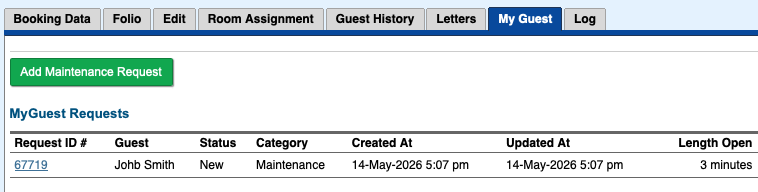
In MyPMS the Tape Chart and each booking allows a User to add a Maintenance Request or to view one that has been entered (if there is a booking number assigned to the Maintenance request, the tab My Guest will show any Request(s) for that booking). Users can add maintenance Request and track them from the PMS or via the app or web..

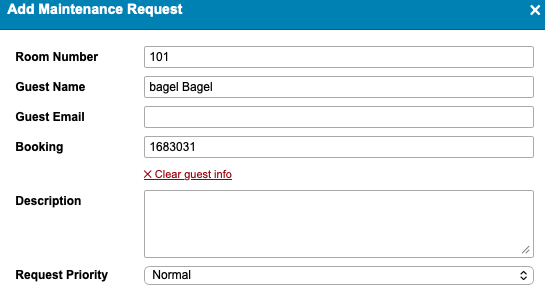
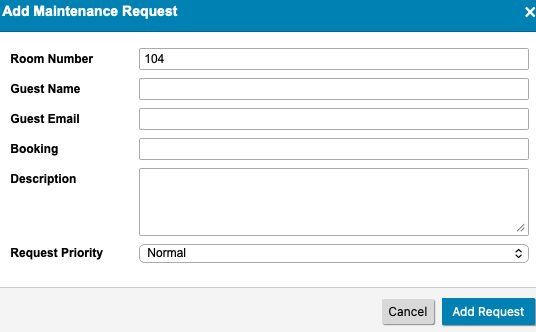
When 'Add maintenance Request' is clicked, a form appears for your staff:
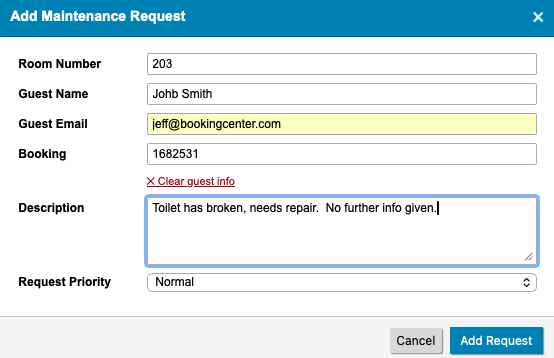
*note: the Priority (2 options: Normal and High) is to allows a user to 'sort' requests.
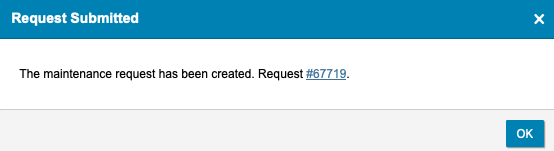
Once the User clicks 'Add Request', the result is a new Request, it has been sent as a 'notification' to whoever was set as the 'default' maintenance user for your property, and it saves to the booking. Clicking the Request ID will open the request.
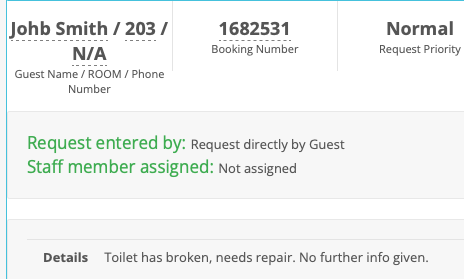
The details will saved to the new maintenance Request created:
...and the booking that initiated the request will now show the Request and its status.
Adding Maintenance Request from the Tape Chart
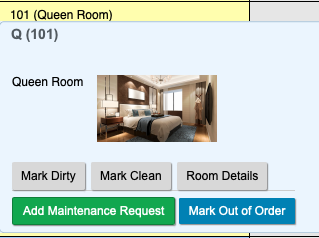
From any room on the Tape Chart, a User can assign a Maintenance Request for that room.
If the Room has an ACTIVE booking in I t, then the Guest name and Booking Number defaults , but it can be removed if the maintenance request isn't appropriate to that Guest and/or Booking.
If the Room has no active booking, then the User must fill in some details to assist the Maintenance staff with the request.
Armed with the BookingCenter mobile app (or they can use a web browser), the User receives notification and the system notates the time the request was sent.
MyGuest Maintenance Dashboard and Request Views
- The Maintenance Dashboard is displayed to all Users. If you only want the Maintenance User to view Maintenance requests - and other PMS areas - then set the User Role to "MyGuest only".
- To receive notifications on the Mobile App, the User must have "Maintenance" set to ON in the App (under Interfaces). To do this, open the App and then click on the "Gear" icon (iPhone) or the "bell" icon (Android), in the top left corner. There will be a list of notification categories. Go to Interfaces Maintenance and set to ON.
- The Dashboard displays the number of Pending Requests, Open and Closed Requests for the Maintenance (User).
Overview
Content Tools
