Page History
For customers who are subscribed to the General Ledger (GL) postings interface, BookingCenter provides a service to map the Transaction Categories, Inventory Items, and Receipt Types so that your General Ledger (GL) can be keep current - automatically. The service posts each day's Transaction Summary to your GL system, either manually or via a machine process as a JSON array, that has been 'mapped' to the GL system you use. BookingCenter can provide this mapping as a service for customers of Quickbooks Online Edition, but we are happy to work (via our QuickBooks app: "BookingCenter to Your GL", but the GL array of data works with other web-accessible GL systems, as well. Contact us for assistance.
...
- A unique URL we provide that uses an API key to keep secure each client's data. This string requires a customer to place a date into the string to receive the array of data for that specific day, and that data must be earlier than the current System Date.
- BookingCenter can provide a simple web form that can be placed on your accountant's secure page that enables a date entry to acquire the JSON array.
- "BookingCenter sends an automated daily email at Night Audit with the JSON embedded into an email so that it an can be human- or machine-read from whatever tool a customer uses. This email is also a 'backup' file that can be kept for a long as necessary to validate what occurred at Night Audit on a given date.
The subject of the General Ledger email will be "BookingCenter General Ledger JSON for <Property Name> on 21-OCT-2025". Note that the date shown on the email will be for the date that was prior to 'increment date', so will be 'yesterday' and the data will equal what can be viewed by running the MyPMS Transaction Summary report. In the example here, one would use Oct 21, 2025 to review. Because the JSON will always equal the Transaction Summary data, one can always go backward in time to request the array again. Just as someone can go back and request the Transaction Summary report, for example, Oct 21, 2025.
...
Because BookingCenter contains all details about a property's current 'liability' for Advanced Deposits and Accounts Receivables, we treat these categories special. Some PMS systems attempt to credit and debit each Payment and Charge to attempt to keep the GL up-to-date with these two important liability accounts. But to do this accurately, each payment / credit to a Folio, as well as all cancellations and cancellation reconciliation, require that the operator makes a proper association for the Payment and Charge to update the GL with exactly what the payment, refund, or charge is supposed to credit/debit. This is too much complexity for most Users of a PMS, and has no value to a property attempting to clearly understand their Advanced Deposits and Accounts Receivables liabilities. Instead, BookingCenter uses 'now' to post the total of the Advanced Deposits and Accounts Receivables amount to the GL, and all detail can be found in the respective PMS reports: Advanced Deposit and Accounts Receivable Aging.
QuickBooks Special Conditions:
- The AR (account receivables) uses the special rules built into QuickBooks to include the 'BookingCenter AR' into the AR (account receivables) tools of QuickBooks.
- BookingCenter uses a generic 'current liabilities' account for the 'BookingCenter Advanced Deposits ' recorded each day as a single number from each day's GL posting. There are no special rules/ tools for tracking Advanced Deposits in QuickBooks.
Direct Bills 'paying' a Folio and Companies 'paying' Direct Bills 'paying' a Folio and Companies 'paying' their Accounts Receivables accounts.
...
The Advanced Deposit number included in the JSON array is also, as in Accounts Receivables, always 'today'. The amount reported here will be whatever the Advanced Deposit report was as of the Night Audit event that triggered the JSON to be delivered. Thus if a property was to run a past date for a JSON array, the Advanced Deposit will take 'today' and not attempt to assess what the Advanced Deposit amount was at that past date. It is always 'now'.
Automating the JSON to a General Ledger GL System
Because BookingCenter is designed with daily checks built-into MyPMS, we reduce the complexity of managing the Accounts Receivable and Advanced Deposit liabilities accounts in your GL. When issuing Payments and Charges to Folios, as well as Cancelling and Editing Bookings, the traditional Guest Ledger and City Ledger required Users to allocate these events to specific GL code(s) to decide what account to credit/debit. Instead, because of the checks built-into MyPMS, GL automation keep the daily activity 100% accurate, while avoiding duplication of managing the Accounts Receivable and Advanced Deposit liabilities accounts in both the PMS and the GL. When automating your GL, BookingCenter does this by 're-setting' the daily Accounts Receivable and Advanced Deposit liabilities account totals, and then posting the new number each day. For example, if the GL account for Accounts Receivable was $1,250 'yesterday', we read that total, offset it with a -1250 entry, then post the current (ie 'today') Accounts Receivable amount that was accurate as of Night Audit and detailed in the Accounts Receivable Aging report. We do the exact same thing with the Advanced Deposit liabilities account. This saves a property a lot of accountant time and frees up staff to focus on guests and the art of hospitality - not allocating Payments & Charges to Folios and Cancellations & Edits to specific GL accounts to track these events in a GL system,
Posting the GL data to QuickBooks OnlineEdition
When the GL is automatically placed into your QuickBooks, an email summary will be sent that summarizes what was posted as follows:
From: BookingCenter GL Interface <admin@bookingcenter.com>
Date: Thu, May 29, 2025 at 12:00 PM
Subject: BookingCenter GL to QuickBooks result for MYPMSDO on 22-OCT-2025
To: <Your Billing Email>@<your domain>.
Item: RENT Value: 2444.00 Journal Entry created. ID: 552
Item: Totals for Taxes Value: 366.60 Journal Entry created. ID: 553
Item: RENT Value: 2444.00 Journal Entry created. ID: 554
Item: Totals for Taxes Value: 366.60 Journal Entry created. ID: 555
Item: RENT Value: 2444.00 Journal Entry created. ID: 556
Item: Totals for Taxes Value: 366.60 Journal Entry created. ID: 557
Item: RENT Value: 2444.00 Journal Entry created. ID: 558
Item: Totals for Taxes Value: 366.60 Journal Entry created. ID: 559
Item: RENT Value: 2444.00 Journal Entry created. ID: 560
Item: Totals for Taxes Value: 366.60 Journal Entry created. ID: 561
Item: RENT Value: 2444.00 Journal Entry created. ID: 562
Item: Totals for Taxes Value: 366.60 Journal Entry created. ID: 563
Item: RENT Value: 2444.00 Journal Entry created. ID: 564
Item: Totals for Taxes Value: 366.60 Journal Entry created. ID: 565
Item: RENT Value: 2444.00 Journal Entry created. ID: 566
Item: Totals for Taxes Value: 366.60 Journal Entry created. ID: 567
When there is no GL data to report for a specific day, because there were no transactions for that date, the email will be as follows:
From: BookingCenter GL Interface <admin@bookingcenter.com>
[
Subject: BookingCenter QBOE General Ledger JSON for A MYPMS demo hotel on 30-JAN-2025
Date: May 29, 2025 at 4:01:03 PM PDT
To: <Your GL Email>@bookingcenter.com
Reply-To: noreply@bookingcenter.com
"ERROR",
"No Transactions found for 30-JAN-2025"
]
Examples of a GL JSON array
Below are examples of what is provided in our JSON:
QuickBooks Special Conditions:
- The AR (account receivables) uses special rules built into QuickBooks, and APIs from outside systems cannot over-ride QuickBook's rules. For this reason, to include the 'BookingCenter AR' into the Chart of Accounts in QuickBooks, the 'default' AR in QuickBooks cannot be used, a new one that is a 'Current Liabilities' account type needs to be cerated and should have a clear description such as ''BookingCenter AR' to clearly show the value.
- BookingCenter uses a generic 'current liabilities' account for the 'BookingCenter Advanced Deposits ' recorded each day as a single number from each day's GL posting. There are no special rules/ tools for tracking Advanced Deposits in QuickBooks.
- The Account Type: BANK also cannot be used, as it also uses special rules built into QuickBooks. Thus when offsetting 'Bank' for income transactions such as cash, credit cards, etc we recommend setting up a Account Type: Other Current Asset using a Detail Type: CashOnHand because a QuickBooks JournalEntry / Purchase posting will trigger a “Business Validation Error” when trying to post a BANK account directly via the API.
Automating the JSON to a General Ledger GL System
Because BookingCenter is designed with daily checks built-into MyPMS, we reduce the complexity of managing the Accounts Receivable and Advanced Deposit liabilities accounts in your GL. When issuing Payments and Charges to Folios, as well as Cancelling and Editing Bookings, the traditional Guest Ledger and City Ledger required Users to allocate these events to specific GL code(s) to decide what account to credit/debit. Instead, because of the checks built-into MyPMS, GL automation keeps the daily activity 100% accurate, while avoiding duplication of managing the Accounts Receivable and Advanced Deposit liabilities accounts in both the PMS and your GL. When automating your GL, BookingCenter does this by 're-setting' the daily Accounts Receivable and Advanced Deposit liabilities account totals, and then posting the new number each day. For example, if the GL account for Accounts Receivable was $1,250 'yesterday', we read that total, offset it with a -1250 entry, then post the current (ie 'today') Accounts Receivable amount that was accurate as of Night Audit and detailed in the Accounts Receivable Aging report. We do the exact same thing with the Advanced Deposit liabilities account. This saves a property a lot of accountant time and frees up staff to focus on guests and the art of hospitality - not allocating Payments & Charges to Folios and Cancellations & Edits to specific GL accounts to track these events in a GL system,
Posting the GL data to QuickBooks OnlineEdition via the BookingCenter app: "BookingCenter to Your GL"
When the GL is automated to your QuickBooks, using the QuickBooks app called "BookingCenter to Your GL", you have access to a web service that enables you to setup, map, and test the GL process between MyPMS and your QuickBooks system. The area looks like this:

- Mapping Accounts – This checks that your mappings are correct in QB and BookingCenter.
- QuickBooks Accounts – loads all QuickBooks Accounts directly from Quickbooks.
- QuickBooks Customers – loads all QuickBooks Customers directly from Quickbooks (used for AR).
- A/R and A/D - shows the QuickBooks account that is connected to the mapping in BookingCenter.
- Tech/Setup - shows the ClientID / Token settings etc.
- Import - Allows you to see the JSON data for the specific System Date and Import to QB, if needed. Note when you import, it will import to QB all records for that SystemDate as shown in the JSON array.
When we train a customer with the GL process to QuickBooks, there may initially be problems with GL mappings (errors get both emailed and visible on the screen, if so) and thus re-importing to the GL may need to occur. If left un-attended, this can be a BIG problem for the accountant to go back into QuickBooks Journal and remove/delete the errant postings, or re-import via the QB.BookingCenter.com area (which can create duplicate GL entries).
For best practices, BookingCenter recommends that all new customers follow the approach:
- After double-checking your mappings and GL account codes, use the QB.BookingCenter.com area to Import the data for the first day or two of entries, and audit to make sure your assumptions were correct in your QuickBooks accounts.
After a few days of using the QB.BookingCenter.com area's Import button for each System Date, then use manual Night Audit for a couple days to get the Night Audit process working properly, including the ""BookingCenter to Your GL" automation.
- If you then choose to use Automatic Night Audit, make that switch after at least 2 days of manual Night Audit and pay attention to the emails and arrays sent to you, run reports and confirm the expected results are delivered.
Importing via Night Audit: Manual and Automatic Night Audit.
BookingCenter has checks to assure a User does not import multiple times for a System Date, either manually via the QB.BookingCenter.com area; via manual Night Audit; or via Automatic Night Audit. Ideally the import should be done only once, as multiple Imports would require you to accept multiple entries or multiple entries delete Journal entries in QuickBooks - a painful exercise.
The import tool also enables a re-import for a specific date (note, it's always the 'System Date' that loads the JSON for import - and thus will equal that System Date's Transaction Summary report). But the Log is always the 'clock date', which is the QuickBooks actually imported in Pacific time, which is often different than the hotel's System Date. The Import tool allows a user to select which Items they want imported, avoiding duplicating GL entries already made for that System Date. BookingCenter logs each System Date entry to make sure Night Audit (manual or automatic) or a manual 'Import' action will not re-submit journal entries. If a System Date was already imported, there is an error message presented on the screen in the QB.BookingCenter.com area such as the following:
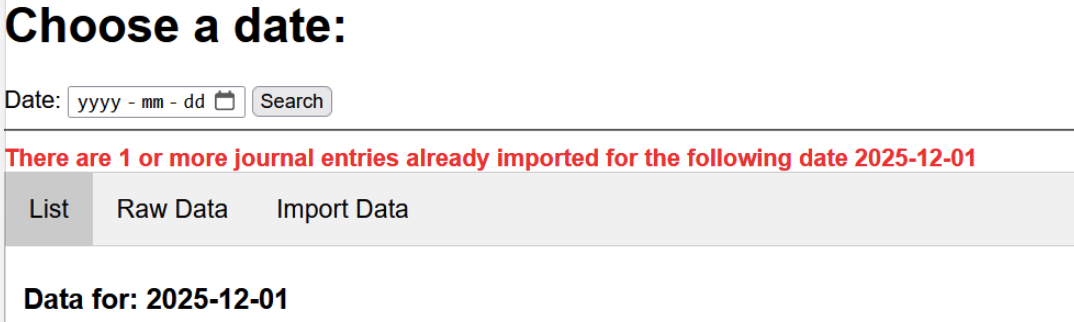
When using a date for the Import Tool, simply de-select those mappings you DO NOT want to re-import to QB form that date.
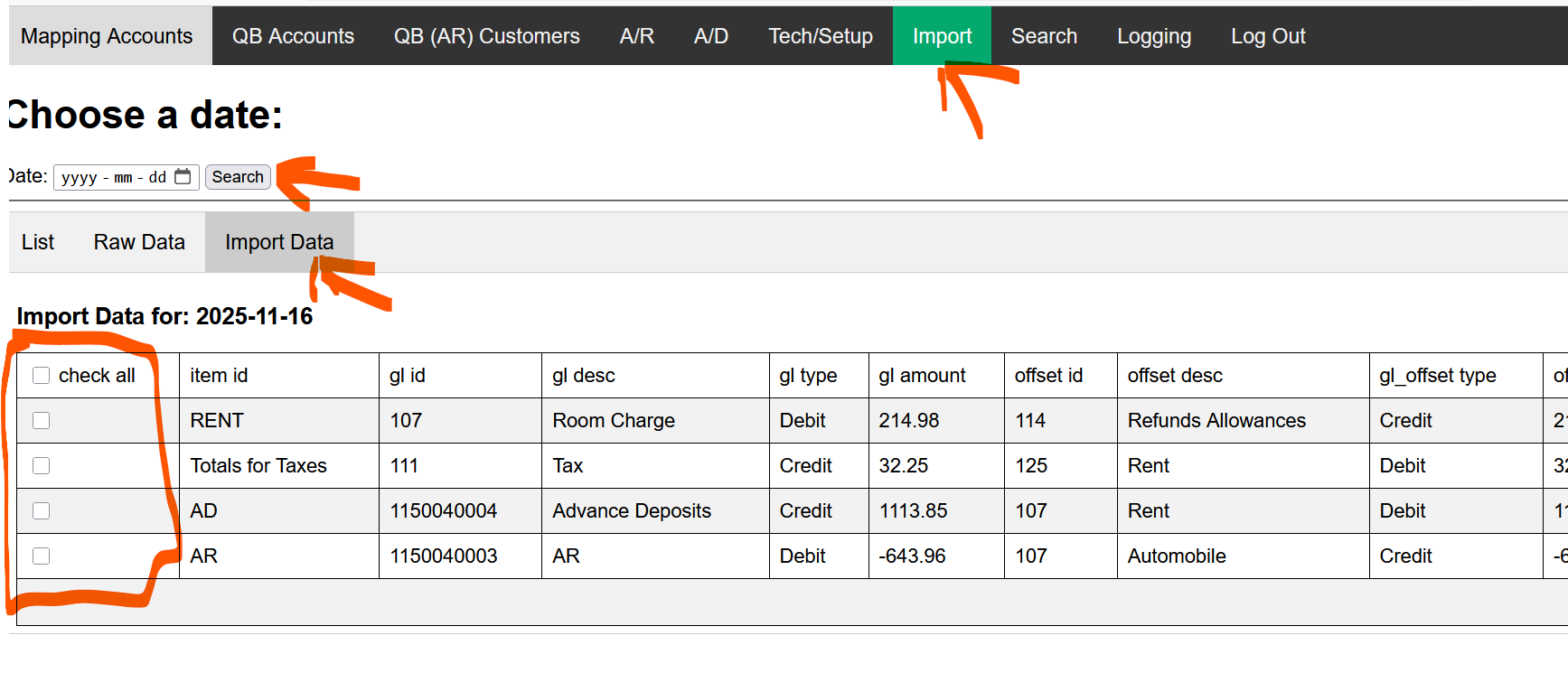
If the log shows that a System Date entry has already been done (whether with errors or not) then the User will need to approve the action, as it could re-import records already sent to QuickBooks.
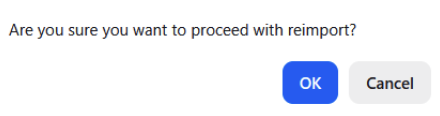
As described above, though, it may that there were errors with only specific categories that have been fixed, and the accountant is now trying to re-import, and that is an excellent reason to answer YES and allow a re-import for a System Date that had been run prior.
- Search – Allows you to search for a Journal entry that imported. This only searches 1 day at a time.
- Logging – QuickBooks logs each entry and error. Search any date required, but note that the date for the QuickBooks is actual time and date (listed in Pacific Time, ie, California) that the Journal entry was entered. Depending on how you use Night Audit, that may/not be the actual date of your System Date.
Cross checking the accounting integration
#1 The Folio posting that occur at night Audit goes out to your email on record, as such:
From: "BookingCenter Support" <folioarch@bookingcenter.com>
The following folios were charged Room Rent as a result of your Night Audit process for 14-NOV-2025
Subject: MYPMSDO Charge Folio Results for 14-NOV-2025
Date: November 22, 2025 at 1:30:20 PM PST
To: info@bookingcenter.com
Guest: douglas, smith Folio Number: 11090062 Room: 221 Room Rent: 189
Guest: Amy, Tweddale Folio Number: 11133371 Room: 206 Room Rent: 194
#2 The email sent when using the "BookingCenter to Your GL, each day to your email on record that summarizes what was posted to QuickBooks, as such:
From: BookingCenter GL to QuickBooks <admin@bookingcenter.com>
Subject: BookingCenter GL to QuickBooks result for MYPMSDO on 14-NOV-2025
Date: November 22, 2025 at 2:00:06 PM PST
To: info@bookingcenter.com
Reply-To: noreply@bookingcenter.com
Item: Totals for Room Rent Value: 383.00 Journal Entry created. ID: 8
Item: Totals for NONCARD Value: 1.00 Journal Entry created. ID: 9
Item: Totals for Taxes Value: 21.83 Journal Entry created. ID: 10
Item: AD Value: 2.00 Journal Entry created. ID: 11
Item: AR Value: 1977.10 Journal Entry created. ID: 12
When there is no GL data to report for a specific day, because there were no transactions for that date, the email will be as follows:
From: BookingCenter GL Interface <admin@bookingcenter.com>
[
Subject: BookingCenter QBOE General Ledger JSON for A MYPMS demo hotel on 30-JAN-2025
Date: May 29, 2025 at 4:01:03 PM PDT
To: <Your GL Email>@bookingcenter.com
Reply-To: noreply@bookingcenter.com
"ERROR",
"No Transactions found for 30-JAN-2025"
#3 The GL JSON array sent via email, and that can be re-generated at any time onto a browser screen, will never change (it is based on the System Date's Transaction Summary report), as such:
Below are whats was sent via email, the detail provided in the JSON for the same date as the example used here:
{ | { { | { "property_id": "TEST", "property_name": "TEST Property", "transaction_date": "2020-JAN-02", "item_id": "VI", "item_description": "Visa", "gl_id": "1003", "gl_desc": "Visa", "gl_type": "Credit", "gl_amount": " 7164383. 7200", "offset_id": " 10041150040006", "offset_desc": " VisaOffsetRoomRent Cash at Bank", "gl_offset_type": "Debit", "offset_amount": " 7164383. 7200" } ,
{ "property_id": " TESTMYPMSDO", "property_name": " TEST PropertyA MYPMS demo hotel", "transaction_date": " 20202025- JANNOV- 0214", "item_id": "Totals for NONCARD", "item_description": "Totals for NONCARD",
6", "gl_desc": " NonCardsTotalNonCardTotals", "gl_type": "Credit", "gl_amount": " 27891.00", "offset_id": " 000401150040006", "offset_desc": " NonCardsTotalOffsetNon Cards Cash at Bank", "gl_offset_type": "Debit", "offset_amount": " 27891.00" } , { "property_id": " TESTMYPMSDO", "property_name": " TEST PropertyA MYPMS demo hotel", "transaction_date": " 20202025- JANNOV- 0214", "item_id": " DEBITTotals for Taxes", "item_description": " DebitTotals for Taxes", "gl_id": " 10071", "gl_desc": " DebitTaxTotals", "gl_type": "Credit", "gl_amount": " 278921. 0083", "offset_id": " 100830", "offset_desc": " DebitOffsetTax Payables", "gl_offset_type": "Debit", "offset_amount": " 278921. 0083" } , | { "property_id": "TESTMYPMSDO", "property_name": "TEST PropertyA MYPMS demo hotel", "transaction_date": "20242025-FEBNOV-2622", "transaction_ref": "Advance Deposits", "item_id": "AD", "item_description": "Advance Deposits", "gl_id": "0000218", "gl_desc": "ADAdvanceDeposit", "gl_type": "Credit", "gl_amount": "122.5000", "offset_id": "1024", "offset_desc": "ADOffsetAdvanceDepositOffset", "gl_offset_type": "Debit", "offset_amount": "122.5000" }, { "property_id": "TESTMYPMSDO", "property_name": "TEST PropertyA MYPMS demo hotel", "transaction_date": "20242025-FEBNOV-2622", "transaction_ref": "Accounts Receivable", "item_id": "AR", "item_description": "Accounts Receivable", "gl_id": "000011150040000", "gl_desc": "AR", "gl_type": "Credit", "gl_amount": "286371977.2010", "offset_id": "1011150040007", "offset_desc": "AROffsetAR Pedning", "gl_offset_type": "Debit", "offset_amount": "286371977.2010" } |
|---|
#4 the Journal report in QuickBooks. Note, this is based on date and time - as Pacific time (California, USA) - of the import to QuickBooks, as such:
Overview
Content Tools