Page History
...
- Mapping Accounts – This checks that your mappings are correct in QB and BookingCenter.
- QuickBooks Accounts – loads all QuickBooks Accounts directly from Quickbooks.
- QuickBooks Customers – loads all QuickBooks Customers directly from Quickbooks (used for AR).
- A/R and A/D - shows the QuickBooks account that is connected to the mapping in BookingCenter.
- Tech/Setup - shows the ClientID / Token settings etc.
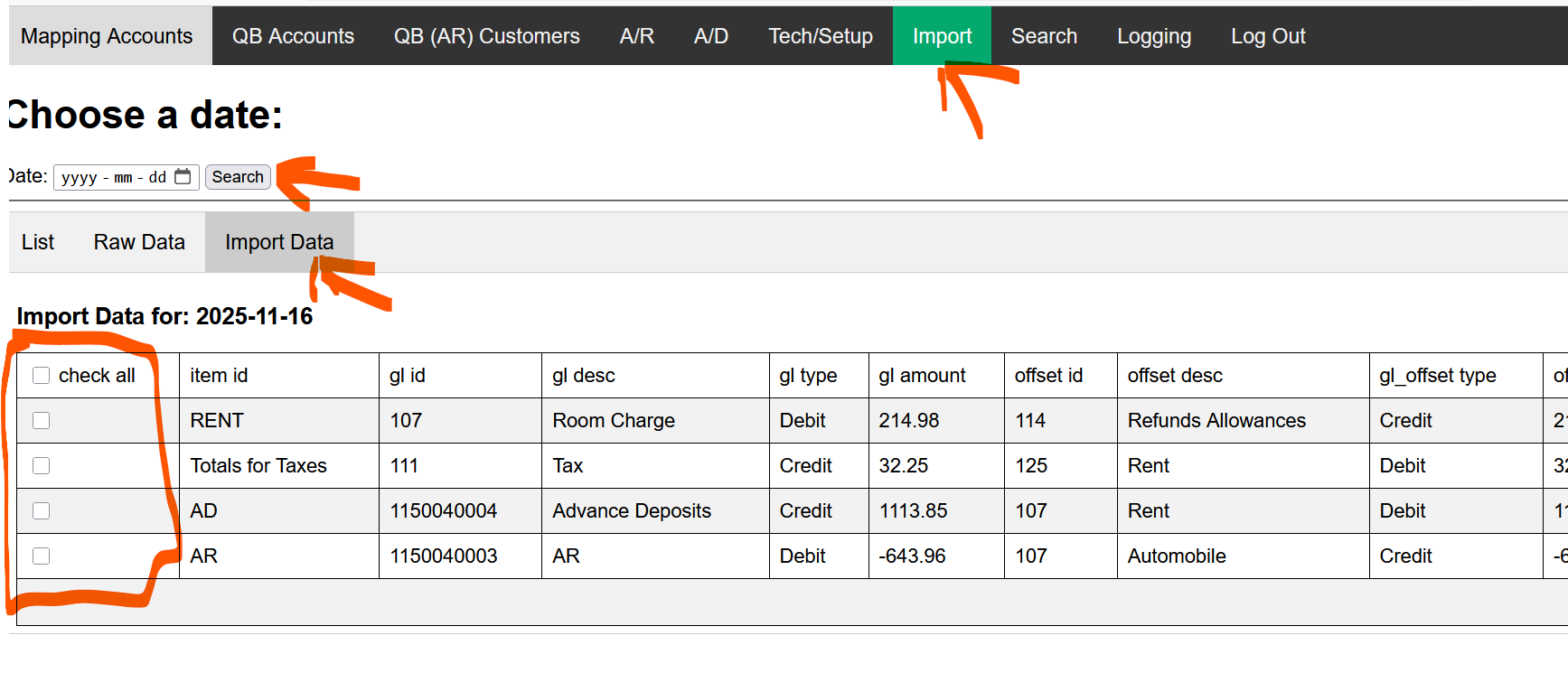
- Import - Allows you to see the JSON and Import to QB if needed. ( Note when you you import, it will import to QB). Do not do this multiple times or you will have to delete Journal entries in QuickBooks.
When we start with the GL process to QuickBooks, there may be problems with mappings (errors get both emailed and visible on the screen) and thus re-importing to the GL will need to occur. This can be a BIG problem because the accountant will have to go back into the their QB and remove/delete the errant postings, or re-import via the QB.BookingCenter.com area and that can create duplicate GL entries. To make this easier for customers, BookingCenter has a tool to enable a re-import for a specific date (note, it's always the 'System Date' that lols the JSON for import - and thus will equal that System Date'
ss Transaction Summary report
). The tool allows a user to select which Items they want imported. But the Log is always the 'clock date' the QuickBooks actually imported in Pacific time, which is often differer than the hotel's SysteDate). The Import tool allows a user to select which Items they want imported, avoiding duplicating GL entries already made for that System Date.
When using a Date for the Import Tool, simply de-select those mapping areas you DO NOT want to re-import to QB form that date.
- Search – Allows you to search for a Journal entry that imported. This only searches 1 day at a time.
- Logging – we log QuickBooks logs each entry and error. Seach Search any date required.
In addition, when you are using the "BookingCenter to Your GL, each day an email summary will be sent to your 'billing email' address that summarizes what was posted to QuickBooks, and looks as follows:
From: BookingCenter GL Interface <admin@bookingcenter.com>
Date: Thu, May 29, 2025 at 12:00 PM
Subject: BookingCenter GL to QuickBooks result for MYPMSDO on 22-OCT-2025
To: <Your Billing Email>@<your domain>.
...
- , but note that the date for the QuickBooks is actual time and date (listed in Pacific Time, ie, California) that the Journal entry was entered. Depending on how you use Night Audit, that may/not be the actual date of your System Date.
The checks on the accounting integration are 3 steps
The Folio posting that occur at night Audit.
From: "BookingCenter Support" <folioarch@bookingcenter.com>
The following folios were charged Room Rent as a result of your Night Audit process for 14-NOV-2025
Subject: MYPMSDO Charge Folio Results for 14-NOV-2025
Date: November 22, 2025 at 1:30:20 PM PST
To: info@bookingcenter.com
Guest: douglas, smith Folio Number: 11090062 Room: 221 Room Rent: 189
Guest: Amy, Tweddale Folio Number: 11133371 Room: 206 Room Rent: 194
The email sent when you are using the "BookingCenter to Your GL, each day an email summary will be sent to your 'billing email' address that summarizes what was posted to QuickBooks, and looks as follows:
From: BookingCenter GL to QuickBooks <admin@bookingcenter.com>
Subject: BookingCenter GL to QuickBooks result for MYPMSDO on 14-NOV-2025
Date: November 22, 2025 at 2:00:06 PM PST
To: info@bookingcenter.com
Reply-To: noreply@bookingcenter.com
Item: Totals for Room Rent Value: 383.00 Journal Entry created. ID: 8
Item: Totals for NONCARD Value: 1.00 Journal Entry created. ID:
...
9
Item: Totals for Taxes Value:
...
21.
...
83 Journal Entry created. ID:
...
10
Item:
...
AD Value:
...
2.00 Journal Entry created. ID:
...
11
Item:
...
AR Value:
...
1977.
...
10 Journal Entry created. ID:
...
12
When there is no GL data to report for a specific day, because there were no transactions for that date, the email will be as follows:
From: BookingCenter GL Interface <admin@bookingcenter.com>
[
Subject: BookingCenter QBOE General Ledger JSON for A MYPMS demo hotel on 30-JAN-2025
Date: May 29, 2025 at 4:01:03 PM PDT
To: <Your GL Email>@bookingcenter.com
Reply-To: noreply@bookingcenter.com
"ERROR",
"No Transactions found for 30-JAN-2025"
]
The GL JSON array sent via email:
Below are whats was sent via email, the detail provided in the JSON for the same date as the example used here:
{ |
|---|
...
When there is no GL data to report for a specific day, because there were no transactions for that date, the email will be as follows:
From: BookingCenter GL Interface <admin@bookingcenter.com>
[
Subject: BookingCenter QBOE General Ledger JSON for A MYPMS demo hotel on 30-JAN-2025
Date: May 29, 2025 at 4:01:03 PM PDT
To: <Your GL Email>@bookingcenter.com
Reply-To: noreply@bookingcenter.com
"ERROR",
"No Transactions found for 30-JAN-2025"
]
Examples of a GL JSON array
Below are examples of what is provided in our JSON:
{ { | { "property_id": "TEST", "property_name": "TEST Property", "transaction_date": "2020-JAN-02", "item_id": "VI", "item_description": "Visa", "gl_id": "1003", "gl_desc": "Visa", "gl_type": "Credit", "gl_amount": " 7164383. 7200", "offset_id": " 10041150040006", "offset_desc": " VisaOffsetRoomRent Cash at Bank", "gl_offset_type": "Debit", "offset_amount": " 7164383. 7200" } ,
{ "property_id": " TESTMYPMSDO", "property_name": " TEST PropertyA MYPMS demo hotel", "transaction_date": " 20202025- JANNOV- 0214", "item_id": "Totals for NONCARD", "item_description": "Totals for NONCARD", "gl_id": " 000046", "gl_desc": " NonCardsTotalNonCardTotals", "gl_type": "Credit", "gl_amount": " 27891.00", "offset_id": " 000401150040006", "offset_desc ": "NonCardsTotalOffset",": "Non Cards Cash at Bank", "offset_amount": " 27891.00" } ,
{ "property_id": " TESTMYPMSDO", "property_name": " TEST PropertyA MYPMS demo hotel", "transaction_date": " 20202025- JANNOV- 0214", "item_id": " DEBITTotals for Taxes", "item_description": "Totals for Taxes" Debit", "gl_id": " 10071", "gl_desc": " DebitTaxTotals", "gl_type": "Credit", "gl_amount": " 278921. 0083", "offset_id": " 100830", "offset_desc": " DebitOffsetTax Payables", "gl_offset_type": "Debit", "offset_amount": " 278921. 0083" } , | { "property_id": "TESTMYPMSDO", "property_name": "TEST PropertyA MYPMS demo hotel", "transaction_date": "20242025-FEBNOV-2622", "transaction_ref": "Advance Deposits", "item_id": "AD", "item_description": "Advance Deposits", "gl_id": "0000218", "gl_desc": "ADAdvanceDeposit", "gl_type": "Credit", "gl_amount": "122.5000", "offset_id": "1024", "offset_desc": "ADOffsetAdvanceDepositOffset", "gl_offset_type": "Debit", "offset_amount": "122.5000" }, { "property_id": "TESTMYPMSDO", "property_name": "TEST PropertyA MYPMS demo hotel", "transaction_date": "20242025-FEBNOV-2622", "transaction_ref": "Accounts Receivable", "item_id": "AR", "item_description": "Accounts Receivable", "gl_id": "000011150040000", "gl_desc": "AR", "gl_type": "Credit", "gl_amount": "286371977.2010", "offset_id": "1011150040007", "offset_desc": "AROffsetAR Pedning", "gl_offset_type": "Debit", "offset_amount": "286371977.2010" } |
|---|
Overview
Content Tools